
Managing connections
Connections let your organization authorise an outside account once, so Twin can reach it on your behalf.
Open the Connections tab
- Click your name at the bottom of the left sidebar.
- Select Organization.
- Open the Connections tab.
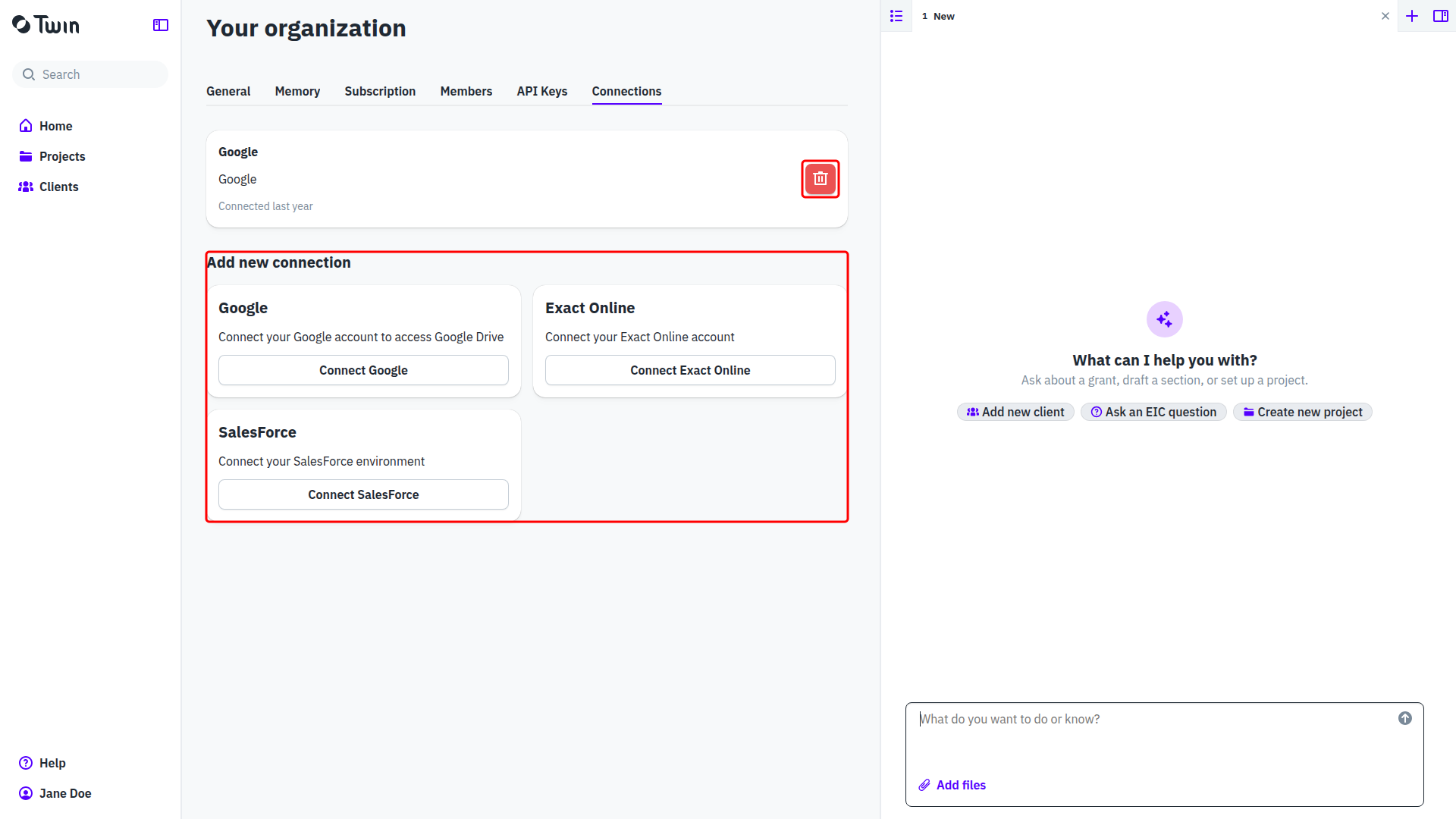
Only an Organization Owner can open the organization pages. A connection belongs to the organization, not to you, so everyone in it uses the same connection.
Add a connection
Under Add new connection you will find a card per provider, each saying what the connection gives Twin access to:
- Google: connect your Google account to access Google Drive
- Exact Online: connect your Exact Online account
- SalesForce: connect your SalesForce environment
Click Connect Google, Connect Exact Online or Connect SalesForce. Twin sends you to that provider to sign in and approve the access it asks for, then brings you back to this tab and confirms with Integration connected. The new connection appears at the top of the page with the date it was made.
Remove a connection
- Click the red trash icon on the connection you want to remove.
- Confirm in the Delete connection dialog.
Twin confirms with Connection removed and the card disappears. Removing a connection only revokes Twin's access; the account itself is untouched, and you can connect it again later.
Good to know: the provider list is fixed and comes from Twin, so you cannot add a provider yourself. Vincere and X were offered in earlier versions and are no longer available.
Related: Organization settings.